Everything that goes to the job. Accounted for.
Equipment and materials tracked together on the same job record, from first scan to final closeout.

for Job Site Asset and Inventory Tracking
Panatrack ST is built for operations that send equipment and materials to job sites and need to know what happened to all of it. Not warehouse stock for resale, not order fulfillment. The equipment and materials your crews take out, use up, and bring back on every job. Both tracked together, on the same job record.
Whether you run multiple crews across active sites, stage equipment out of a central warehouse, or load vans for the week, Panatrack ST Job Site Asset and Inventory Tracking gives you a documented, scan-verified record of what went out, what was consumed, and what came back.
Most job site problems aren't logistics problems. They're accountability problems.
You know what you sent out. What you don’t know is who has the equipment right now, what materials got used, what moved to a different crew, and whether what came back matches what left. When equipment and materials both move across job sites without a documented record, the gaps show up at closeout, or when something goes missing and nobody can say who had it last. Every one of those gaps costs money, in replaced equipment, over-ordered materials, and hours spent reconciling after the fact.
- Equipment comes back from a job but nobody checked it in, then disappears before the next one.
- Materials get over-ordered because nobody knew what was already at the site.
- Something goes missing and there's no record of who had it last or where it was.
- Closeout drags on and material usage gets estimated, so job costing is based on guesses.
- Equipment goes back out before anyone checks whether it needs service.
What you get with Panatrack

Equipment and materials on the same record
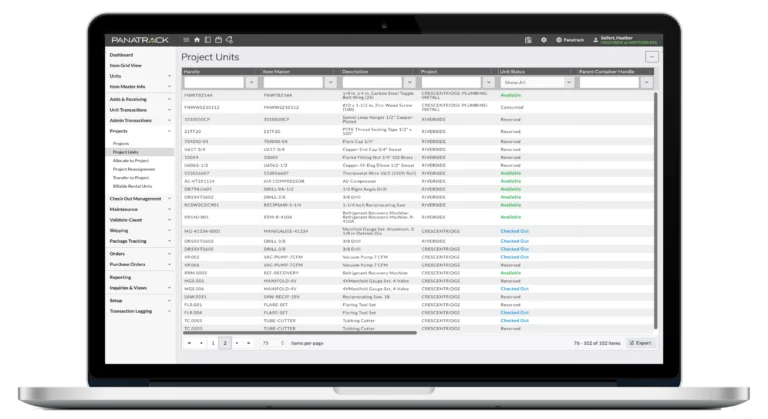
A piece of equipment checked out to a crew and materials allocated to the same job are both tracked on the same job record. Not two systems. Not a spreadsheet alongside your tracker.
Tracked while it’s out there
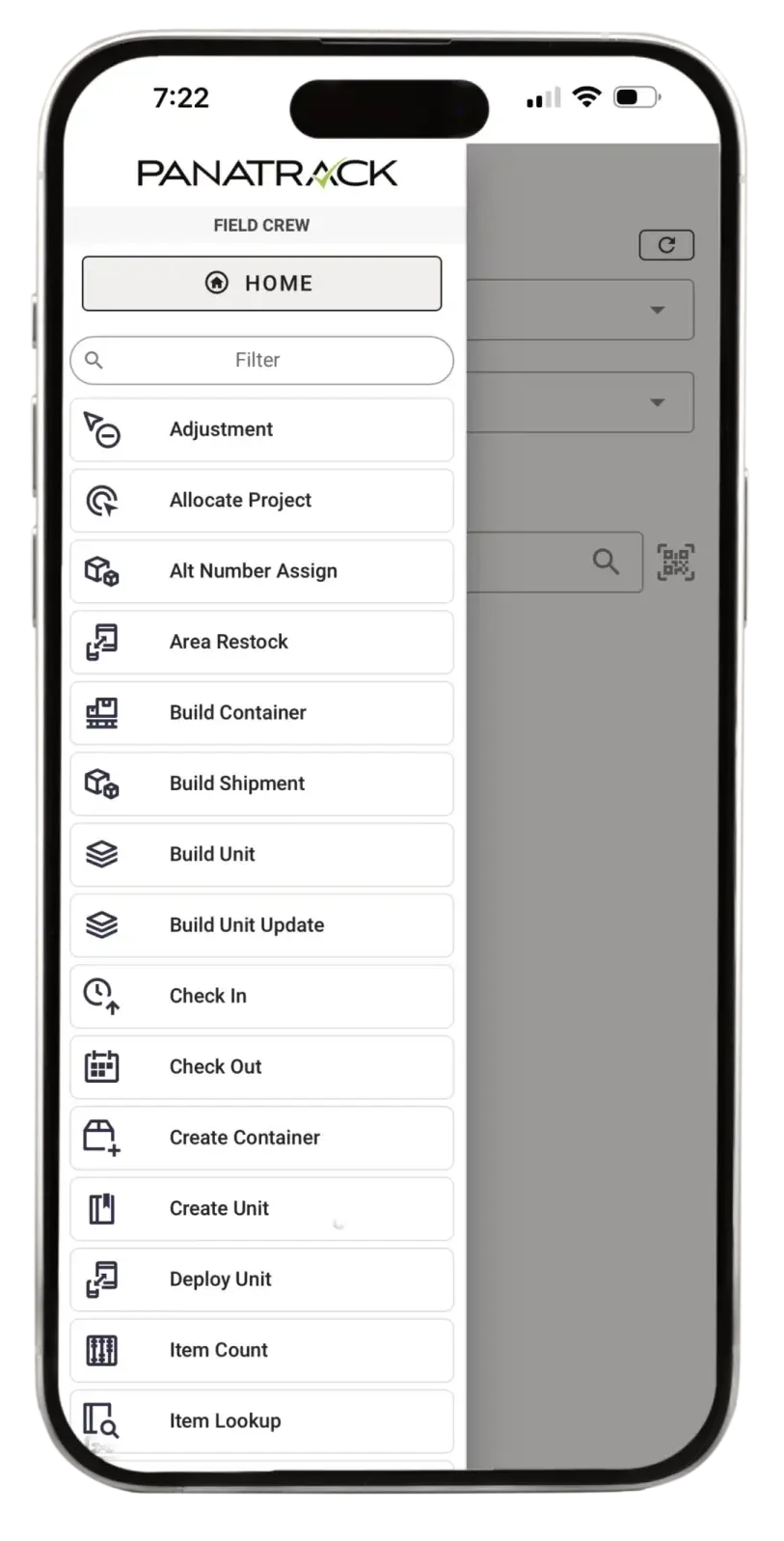
Crew members record usage, handoffs, and location changes in the field by scan or in-system selection. Each action is attributed to the person who recorded it, so the record stays current throughout the job and always shows who used what and who has an item right now.
Allocate materials before the job starts
Assign expected quantities to a job before crews leave. As materials are consumed in the field, actuals track against what was allocated. If something is running short, it’s visible during the job, not at closeout.
Know who had it last
When something doesn’t come back, the record shows the last person who had custody, the last job it was on, and the last location it was scanned at. The answer is a search, not a conversation.
Consumption documented, not estimated
Every material usage is recorded during the job. Job costing reflects what was actually used, not what someone approximated after the fact.
SOC 2 Type II certified
Independent auditors verify our security controls annually. When a customer or partner asks about data security, you point to a third-party audit report, not a self-assessment.

Scheduled maintenance plans
Set up recurring schedules per item type and track by time period, hours, or mileage. See maintenance on dashboard or in grid views. When equipment is transferred or checked out, the system automatically flags overdue maintenance, and items can be set to out-of-service until the work is done.
Parts used in maintenance
Parts and supplies consumed during a service are recorded against the equipment record. Full service history stays with the item, not in a separate spreadsheet.
Unplanned maintenance
Record unscheduled repairs whenever needed. Every activity is logged with who, what, when, and what parts were used.
From receiving to job site to restock.
Stage & assign
Allocate materials and check out equipment to the job before anything leaves. Every item is linked to the job record from the start.
Send it out
Load trucks, move containers, record everything leaving the warehouse. One scan at the container level accounts for everything inside.
Track it in the field
Record usage, handoffs between crew members, and location changes during the job by scan or in-system selection. The record stays current throughout.
Close it out
Check equipment back in. Record what was consumed. Compare what went out against what came back. See anything missing before the next job starts.
Clear for the next job
Overdue maintenance pops up on check-in. Items are cleared for the next job only after service is confirmed. The cycle starts clean.
Three ways Panatrack ST works alongside your existing systems.
Job-Directed Expensed Inventory
Items are purchased for a specific job and expensed at receipt or consumption. Your ERP records the cost. Panatrack ST tracks the physical item through the job lifecycle. Allocated, consumed, and returned all have a scan-verified record even after your financial system stops tracking.
Inventory Management Add-On
Most ERPs are designed for post-transactional data entry. Transactions are recorded after physical activity occurs, often saved for later posting. Panatrack ST captures at the point of action, and usage transactions synchronize back to your ERP to keep job costing accurate without duplicate entry.
Standalone Parts and Supply System
Manage equipment and job inventory in Panatrack ST as a standalone system. Plan quantities, track actuals against budget, and manage the full lifecycle of every item and asset without requiring a separate ERP.
Ready to see how it works for your operation?
Core Features for Job Site Tracking
Job Records
Equipment and materials tracked together on the same job record, from send-out to closeout.
Check-out
Check assets and equipment out to a crew, job, or individual. Expected return, condition notes, full custody record.
Usage Recording
Record material usage at the point of action. What was consumed is documented, not estimated at closeout.
Moves and Transfers
Transfer equipment between crew members on a job. Custody updates as transfers are recorded, so you always know who has it.
Movable Containers
Group equipment and materials together. One scan loads a truck or van. Everything inside moves as a unit
Job Closeout
Compare what went out against what came back and what was consumed. Equipment checked in, materials reconciled, shortages made visible.
Audit Trail
Every transaction logged with who, what, when, and where. Tamper-evident records for every asset and material movement.
Maintenance Tracking
Set up maintenance schedules per item type: equipment, tools, or vehicles. Record service history, track parts used, and flag overdue maintenance automatically at check-out, check-in, or transfer.
Mobile Access
Available on iOS, Android, and dedicated barcode scanners. Record transactions from anywhere on the job.
Signature Capture
Capture signatures on check-outs and transfers for an additional layer of accountability on every transaction.
Tracking parts consumed against scheduled and unplanned maintenance? See how Panatrack ST handles maintenance management.
Built for operations that keep equipment and materials moving.
Construction
Energy
Oil & Gas
Utility
Public Safety
Agriculture
Panatrack also supports a wide range of industries beyond those listed, helping keep your team organized wherever they work.
Panatrack has built tracking software around real operations for 25 years. SOC 2 Type II certified, with experienced people involved from the first conversation through deployment.


Frequently Asked Questions
How do you track equipment and materials on the same job?
We’ve been using spreadsheets. Why change to Panatrack ST?
How is this different from the software we use for purchasing, scheduling, and billing?
Those systems handle the money and the schedule, but they stop tracking the physical item once it’s purchased. Panatrack ST tracks the item itself across crews, sites, and the job: what went out, who has it, and what came back. You can record what an item cost and which job it was used for, and record usage as it happens. It works alongside your existing systems to fill the gap between them.
Can we see what a job actually used, for job costing?
What happens at job closeout?
Can crews record from the field?
Does it track equipment maintenance too?
Ready to see how it works for your operation?
Tell us about your operation and we’ll show you exactly how ST handles it.